Wire the drive control circuit as shown in Figure 1.
Figure 1. Control Circuit Connection Diagram
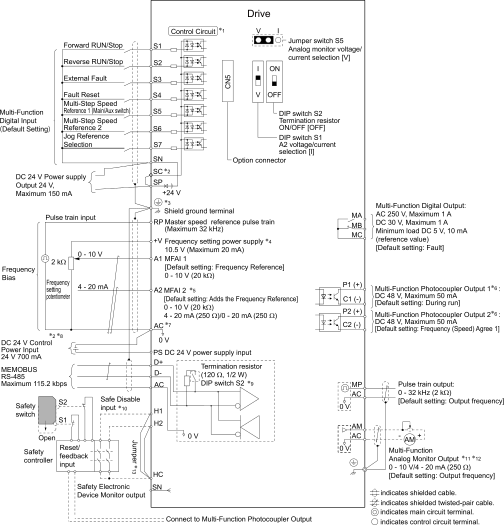
1
Connect a 24 V power supply to terminals PS-AC to operate the control circuit while the main circuit power supply is OFF.
To set the MFDI power supply (Sinking/Sourcing Mode or internal/external power supply), install or remove a jumper between terminals SC-SP or SC-SN depending on the application.
| Notice |
|
Damage to Equipment
Do not close the circuit between terminals SP-SN.
If you close the circuits between terminals SC-SP and terminals SC-SN at the same time, it will cause damage to the drive.
|
-
Sinking Mode, Internal power supply: Install the jumper to close the circuit between terminals SC-SP.
| Notice |
|
Damage to Equipment
Do not close the circuit between terminals SC-SN.
If you close the circuits between terminals SC-SP and terminals SC-SN at the same time, it will cause damage to the drive.
|
-
Sourcing Mode, Internal power supply: Install the jumper to close the circuit between terminals SC-SN.
| Notice |
|
Damage to Equipment
Do not close the circuit between terminals SC-SP.
If you close the circuits between terminals SC-SP and terminals SC-SN at the same time, it will cause damage to the drive.
|
-
External power supply: Remove the jumper from the MFDI terminals. It is not necessary to close the circuit between terminals SC-SP and terminals SC-SN.
| Warning |
|
Electrical Shock Hazard
When you connect the shield wire of the control circuit wiring to the protective ground terminal, do not connect the protective ground wire.
If you connect the shield wire and the protective ground wire to the protective grounding terminal, it may not comply with the technical standards and local safety regulations and can cause serious injury or death.
|
The maximum output current capacity for terminal +V on the control circuit is 20 mA.
| Notice |
|
Damage to Equipment
Do not install a jumper between terminals +V and AC.
A closed circuit between these terminals will cause damage to the drive.
|
DIP switch S1 sets terminal A2 for voltage or current input. The default setting for S1 is current input (“I” side).
Do not ground the control circuit terminals AC or connect them to the drive chassis.
| Notice |
|
Do not ground the AC control circuit terminals and only connect the AC terminals as specified by the product instructions.
If you connect the AC terminals incorrectly, it can cause damage to the drive.
|
Do not connect terminals PS and AC inversely. If you connect the wires to the incorrect terminals, it will cause damage to the drive.
Set DIP switch S2 to the ON position to enable the termination resistor in the last drive when you use MEMOBUS/Modbus communications.
To use the internal power supply with the Safe Disable input, use sourcing mode.
Use multi-function analog monitor outputs with analog frequency meters, ammeters, voltmeters, and wattmeters. Do not use monitor outputs with feedback-type signal devices.
Jumper S5 sets terminal AM for voltage or current output. The default setting for S5 is voltage output (“V” side).
Disconnect the wire jumpers between H1 and HC and H2 and HC to use the Safe Disable input.