Standard Connection Diagram
Wire the drive as specified by Figure 1.
| Warning |
|
Sudden Movement Hazard
Set the MFDI parameters before you close control circuit switches.
Incorrect Run/Stop circuit sequence settings can cause serious injury or death from moving equipment.
|
| Warning |
|
Sudden Movement Hazard
Correctly wire the start/stop and safety circuits before you energize the drive.
If you momentarily close a digital input terminal, it can start a drive that is programmed for 3-Wire control and cause serious injury or death from moving equipment.
|
| Warning |
|
Sudden Movement Hazard
When you use a 3-Wire sequence, set A1-03 = 3330 [Initialize Parameters = 3-Wire Initialization] and make sure that b1-17 = 0 [Run Command at Power Up = Disregard Existing RUN Command] (default).
If you do not correctly set the drive parameters for 3-Wire operation before you energize the drive, the motor can suddenly rotate when you energize the drive.
|
| Warning |
|
Sudden Movement Hazard
Check the I/O signals and the external sequences for the drive before you set the Application Preset function.
When you set the Application Preset function (A1-06 ≠ 0), it changes the I/O terminal functions for the drive and it can cause equipment to operate unusually. This can cause serious injury or death.
|
| Notice |
|
Fire Hazard
Install sufficient branch circuit short circuit protection as specified by applicable codes and this manual. The drive is suitable for circuits that supply not more than 31,000 RMS symmetrical amperes, 240 Vac maximum (200 V Class), 480 Vac maximum (400 V Class).
Incorrect branch circuit short circuit protection can cause serious injury or death.
|
| Notice |
|
When the input voltage is 440 V or higher or the wiring distance is longer than 100 m (328 ft), make sure that the motor insulation voltage is sufficient or use an inverter-duty motor or vector-duty motor with reinforced insulation.
Motor winding and insulation failure can occur.
|
Note:
Do not connect the AC control circuit ground to the drive enclosure. Failure to obey can cause incorrect control circuit operation.
Figure 1. Standard Drive Connection Diagram
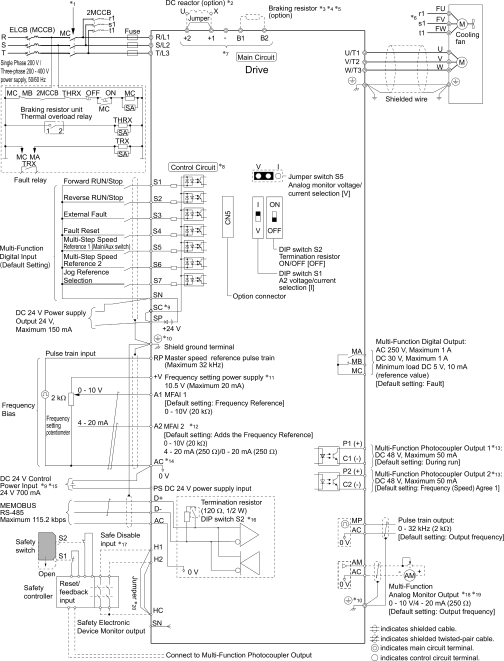
12345678910111213141516171819
1
Set the wiring sequence to de-energize the drive with the MFDO. If the drive outputs a fault during fault restart when you use the fault restart function, set L5-02 = 1 [Fault Contact at Restart Select = Always Active] to de-energize the drive. Be careful when you use a cut-off sequence. The default setting for L5-02 is 0 [Active Only when Not Restarting].
2
When you install a DC reactor, you must remove the jumper between terminals +1 and +2.
3
When you use a regenerative converter or regenerative unit, set L8-55 = 0 [Internal DB TransistorProtection = Disable]. If L8-55 = 1 [Protection Enabled], the drive will detect rF [Braking Resistor Fault].
4
When you use a regenerative converter, regenerative unit, braking resistor, or braking resistor unit, set L3-04 = 0 [Stall Prevention during Decel = Disabled]. If L3-04 = 1 [General Purpose], the drive could possibly not stop in the specified deceleration time.
5
When you use an ERF-type braking resistor, set L8-01 = 1 [3% ERF DB Resistor Protection = Enabled] and set a wiring sequence to de-energize the drive with the MFDO.
6
Cooling fan wiring is not necessary for self-cooling motors.
7
Connect peripheral options to terminals -, +1, +2, B1, and B2.
| Warning |
|
Fire Hazard
Only connect factory-recommended devices or circuits to drive terminals B1, B2, -, +1, and +2. Do not connect an AC power supply lines to these terminals.
Incorrect wiring can cause damage to the drive and serious injury or death from fire.
|
8
Connect a 24 V power supply to terminals PS-AC to operate the control circuit while the main circuit power supply is OFF.
9
To set the MFDI power supply (Sinking/Sourcing Mode or internal/external power supply), install or remove a jumper between terminals SC-SP or SC-SN depending on the application.
| Notice |
|
Damage to Equipment
Do not close the circuit between terminals SP-SN.
If you close the circuits between terminals SC-SP and terminals SC-SN at the same time, it will cause damage to the drive.
|
-
Sinking Mode, Internal power supply: Install the jumper to close the circuit between terminals SC-SP.
| Notice |
|
Damage to Equipment
Do not close the circuit between terminals SC-SN.
If you close the circuits between terminals SC-SP and terminals SC-SN at the same time, it will cause damage to the drive.
|
-
Sourcing Mode, Internal power supply: Install the jumper to close the circuit between terminals SC-SN.
| Notice |
|
Damage to Equipment
Do not close the circuit between terminals SC-SP.
If you close the circuits between terminals SC-SP and terminals SC-SN at the same time, it will cause damage to the drive.
|
-
External power supply: Remove the jumper from the MFDI terminals. It is not necessary to close the circuit between terminals SC-SP and terminals SC-SN.
10
| Warning |
|
Electrical Shock Hazard
When you connect the shield wire of the control circuit wiring to the protective ground terminal, do not connect the protective ground wire.
If you connect the shield wire and the protective ground wire to the protective grounding terminal, it may not comply with the technical standards and local safety regulations and can cause serious injury or death.
|
11
The maximum output current capacity for terminal +V on the control circuit is 20 mA.
| Notice |
|
Damage to Equipment
Do not install a jumper between terminals +V and AC.
A closed circuit between these terminals will cause damage to the drive.
|
12
DIP switch S1 sets terminal A2 for voltage or current input. The default setting for S1 is current input (“I” side).
13
Do not ground the control circuit terminals AC or connect them to the drive chassis.
| Notice |
|
Do not ground the AC control circuit terminals and only connect the AC terminals as specified by the product instructions.
If you connect the AC terminals incorrectly, it can cause damage to the drive.
|
14
Connect the positive lead from an external 24 Vdc power supply to terminal PS and the negative lead to terminal AC.
| Notice |
|
Connect terminals PS and AC correctly for the 24 V power supply.
If you connect the wires to the incorrect terminals, it will cause damage to the drive.
|
15
Set DIP switch S2 to “ON” to enable the termination resistor in the last drive in a MEMOBUS/Modbus network.
16
Use only Sourcing Mode for Safe Disable input.
17
Use multi-function analog monitor outputs with analog frequency meters, ammeters, voltmeters, and wattmeters. Do not use monitor outputs with feedback-type signal devices.
18
Jumper S5 sets terminal AM for voltage or current output. The default setting for S5 is voltage output (“V” side).
19
Disconnect the wire jumpers between H1 and HC and H2 and HC to use the Safe Disable input.